Skip to content
kcorrai Station

kcorrai StationThe agentspace for Windows

Run Claude Code agents side by side. In one window.

Station is a Windows workspace built around the Claude Code CLI: terminals with real shell integration, native browser panels, a board your agents fill in themselves, a git checkout for every agent and a scheduler that keeps the machine usable while they work. Hold Ctrl+Win and talk to any of it.

Download for Windows

Free for 2 days · no card · Windows 10 & 11

See pricing
STATION
mainnpm
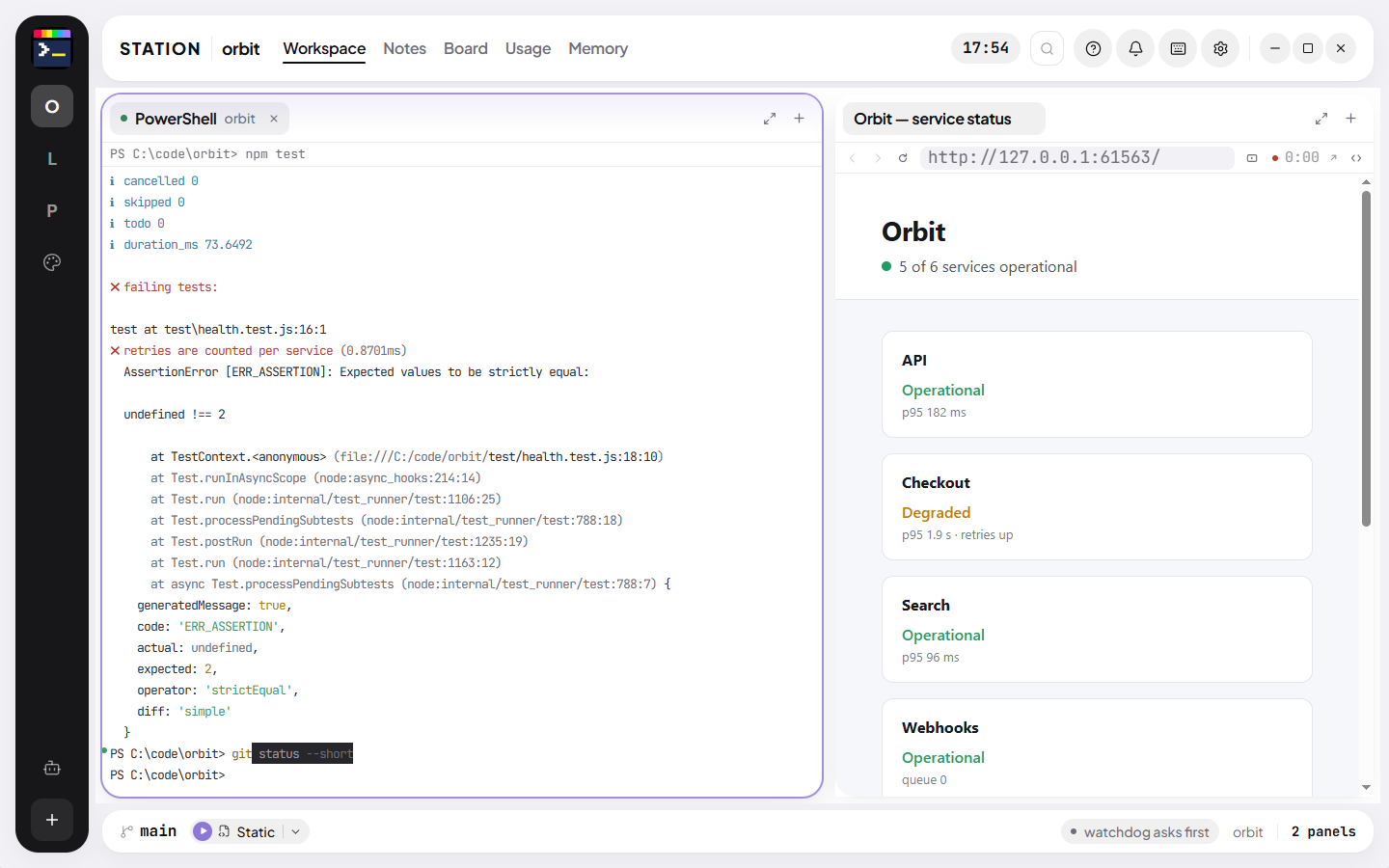
Interactive demo · Sample projectA sample project in your browser. Everything in the window works: type, click, open Settings, press Ctrl+Shift+P.The window is drawn at the app’s own size and shrunk to fit. It is easier to use on a larger screen.

How it is used

Ten agents, one window, one morning

This is how Station is used by the person who builds it: ten Claude Code agents in one repository, each in its own checkout, all of them on one screen. Watch a morning in about a minute, or jump to a chapter.

0:00 / 0:55

1/8 · An agent, a checkout

Ctrl+Alt+T opens a terminal for an agent. When claude starts, Station moves it into a git checkout and branch of its own, before it writes a line.

Recorded in Station, in a sample project · waits sped up

Three jobs

What Station does for someone running agents all day

01

Keeps agents out of each other’s way

The first agent works in your project; every one after it gets its own git checkout, moved there before it writes a line. A file two agents both touched turns red on both rows. Finished branches come home only when they are committed and the typecheck passes.
02

Shows you what every agent is doing

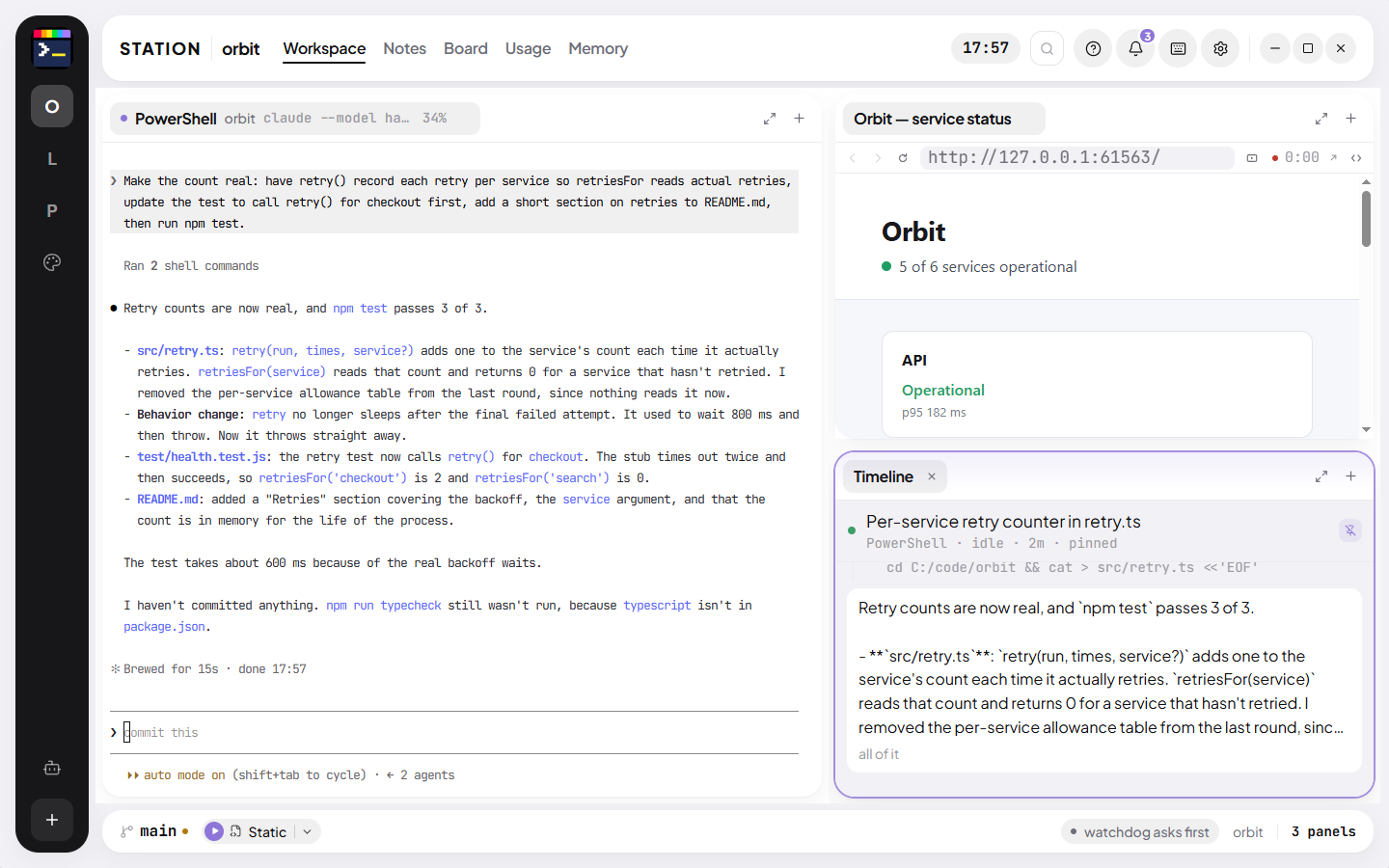
A rail sorts agents into Needs you, Working, Idle and Finished. A timeline follows each one through its edits, commands and failures. Their task lists become cards on a board without anyone copying them over.

03

Lets you talk, show and hand over

Hold Ctrl+Win anywhere in Windows and speak. Send a page’s console errors, a screenshot or the elements you point at on it to a terminal in one keystroke.

Agents

Five agents, one repository, no collisions

Station watches Claude Code through its own hooks, so it knows which agent is working, which one is waiting for you and which files each has touched, without reading over anyone’s shoulder.

  • A checkout per agent under <project>.worktrees, with node_modules borrowed by junction instead of copied
  • An edit to a file another live agent holds is stopped, or only warned about, as you choose
  • Undo an agent’s last turn, including what it changed through Bash
  • A second model reads each turn’s diff and speaks up only when it finds something
Learn more
The agents rail0 need you · 3 working · 1 idle
Rows keep their place and move only when an agent’s state changes. A shared file is marked on both rows.

Dictation

Hold Ctrl+Win. Talk. It is typed where you were.

Dictation works in every application, not just Station. Speak in your own words; a cleanup model removes the filler, keeps your corrections and repairs the technical words speech recognition mangles.

  • Local whisper.cpp on the CPU: no account, no key, no network
  • Or Groq / OpenAI with your own key, for the large models
  • Never presses Enter: words in a terminal stay words until you send them
  • No audio is ever written to disk
Learn more
Dictation, as it runsHoldCtrlWin

PS C:\work\checkout-api> claude

claude ›

Dictation

What the microphone heard

What lands in the terminal

Filler removed, the correction kept, “tripe check” repaired from context. Enter is still yours.

Browser panels

A real browser next to the terminal, and a way to hand it over

Browser panels are native Chromium views docked between your terminals, not iframes. What an agent needs from a page reaches it in one keystroke.

  • Ctrl+Shift+E sends the page’s console errors into a terminal
  • Ctrl+Shift+X: point at what is wrong on the page and say why; the terminal gets each element, its source line and a picture
  • Ctrl+Shift+S captures the page, lets you mark it up and sends the file
  • One sign-in profile shared by every panel
Learn more
A real browser next to the terminal, and a way to hand it over

Scheduler

Agents that wait for the machine, instead of freezing it

Everything expensive Station starts (a Claude session, a build, a test run) asks one desk first. Above your CPU, RAM or disk limits it waits its turn. It never kills anything, and nothing waits longer than ten minutes.

  • Three agents, one build and one test at a time by default; up to eight agents
  • Commands you type are counted, never held
  • Quiet mode lowers Station’s own processes to background priority
  • A board that queues cards when the team is full and sends them when a slot opens
Learn more
The scheduler
CPU38%

85% · hard limit ▲

npm run build

A build asks before it starts. Above the limit it waits and starts by itself when the machine has room.

Terminal

The terminal VS Code has, without the editor around it

xterm.js on VS Code’s own release line, with VS Code’s shell integration scripts ported over. Every command gets a mark and an exit-code dot; Ctrl+↑ and Ctrl+↓ walk between them.

  • PowerShell 7, Windows PowerShell, Git Bash, Command Prompt and WSL: whichever you have
  • Each agent tab shows how full its context window is
  • Shells run in a separate process, so a crash costs a terminal, not the window
  • Close Station and reopen it: an agent’s terminal comes back as that agent
Learn more
The terminal VS Code has, without the editor around it

House rules

How Station behaves

It never presses Enter for you

Station writes prompts, answers and dictated text into the terminal and leaves them there. It sends on its own only where you switched automation on (the watchdog’s “Fix it” mode, for one).

It never kills your work

The scheduler holds things back; it does not end them. Quiet mode lowers priority; it does not stop processes. Files an agent leaves behind are offered to the Recycle Bin, never deleted.

It sits still when nothing happens

An idle Station uses 0% CPU. Indicators play a few beats and hold still, because a loop that never ends keeps the GPU drawing sixty frames a second for nothing.

Your machine, your Claude login

Station runs the Claude Code you installed and signed in to. It never sees your tokens or your API key. Projects, notes and layouts live in a database on your disk.

Every feature, playing

Pick a feature and watch it work

Several Claude Code agents in one repository, without stepping on each other. Learn more →

0:00 / 0:46

1/4 · A checkout for every agent

Ctrl+Alt+T opens a terminal for an agent. The moment you press Enter on claude, Station moves it into a git checkout and branch of its own, before it writes a line.

Recorded in Station, in a sample project · waits sped up

All features →

Shipping

Released this month

Full changelog →

v0.64.0

  • A new look: Station and its apps share one family of marks on an ink-blue tile
  • Design is one screen: the steps run as a trail across the top, and Claude Code works under its own tab on the stage
  • Marketing reads your projects and writes a whole week of posts from what actually happened, into a queue you approve

v0.63.0

  • The reader runs on ChatGPT, an API key or a local model as well as Claude, with a backup AI when a free plan runs out
  • A Marketing space beside Design: one text per platform, a week calendar, ideas from your own commits
  • Hover a link in a browser panel to see where it goes

v0.62.0

  • PDFs read the way Acrobat shows them: one continuous column, Acrobat’s zoom fits, links, contents and search
  • The reader takes web articles, Markdown, subtitles and public-domain books
  • One pill per running server in the status bar, dropped when the server stops

Questions

Do I need a Claude subscription?

Yes. Station runs the Claude Code CLI you install and sign in to, with your own Claude plan or API key. Station does not resell tokens and never sees your key. What your agents use is billed by Anthropic, exactly as it would be without Station.

What happens when the two days are over?

Station asks for a license. Your projects, notes, boards and layouts stay exactly where they were; buy a license, enter the key and carry on.

How many computers can I use it on?

A license is active on up to 3 computers at once. Move it whenever you like: release a computer from Settings → License, or from the customer portal if that computer is gone.

Can I get a refund?

Within 14 days of buying, yes, in full, without a reason. Ask from the receipt or the customer portal.

Does it work offline?

Yes. Station checks its license about once a day when it can, and keeps working for 7 days without reaching the server.

Mac or Linux?

Windows 10 and 11 only, for now. Station leans on Windows itself (ConPTY, its OCR, its efficiency mode) rather than papering over three systems.

What does Station send over the network?

Its license check (a hashed machine id and your key) and an update check against the public releases page. No telemetry, no analytics, no crash reports. Your code and conversations stay on your machine; Claude Code talks to Anthropic as it always does, and a hosted dictation provider hears your voice only if you choose one.

What is the difference between Pro and Lifetime?

Only how you pay. Both have every feature and every update. Pro is a subscription you can cancel any time; Lifetime is paid once.

Can I buy only Shot, Voice, Reader or Pomodoro?

Yes. Each is its own installer with its own two-day trial, and its key opens that app only. A Station key, monthly, yearly or lifetime, opens all four as well as Station itself.

Two days, every feature, no card.

Install Station, open a project and start an agent. If it is not for you, uninstall it. Nothing to cancel.